MXIE

Control All Your Communications Through One Tool
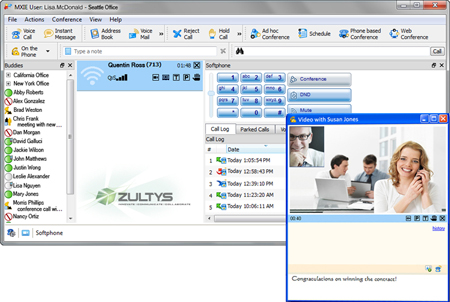
The intuitive, O/S independent, MXIE (Media Exchange Interface for End Users) desktop client integrates and manages all of your communications functions. It lets you see the presence status of others in your company, send emails, control all your phone calls via desktop phones or a softphone, send and receive faxes, send secure Instant Messages and voice messages, use Visual Voicemail, launch a collaborative MXmeeting
™ web conference session, and much more - all with a single mouse click.
That is the power of MXIE. That is the power of Zultys.
Flexible Communications
- Tailor your communications and work anywhere from any phone
- Don't conform to the tool - you define your own communications experience
- Be free to work from anywhere as one office environment
- Assert your Independence and use any phone you want - desktop, mobile or home phone
Make Any Phone Your Phone
MXIE controls all your calling functions and lets you call and be contacted at any phone you want through the MXconnect™ feature. MXconnect lets you designate any phone as your business phone - a SIP phone, an analog phone, or even a mobile phone or home office phone, and Twinning lets you easily switch between one phone and the other. You can also use MXIE's internal softphone feature and turn your computer into your phone.
Digital Fax & Voice Mail Saves You Time
With Zultys your digital fax and voice mail files are easy to sort through using key information such as Caller ID, the date and time of the call, and the length of the call. This allows you to quickly sort through voice mails and faxes and respond to those that need urgent attention. You can even add an annotation to any voice mail or fax. An alert will also pop up on your screen when a new message arrives.

Customize Your MXIE
The MXIE user screen can be tailored to fit any user's needs. Choose to display the toolbar as icons, text or both, and display it horizontally or vertically anywhere in the main window.
Address book, Call Log, Voice Mail and Parked Calls windows can be opened in separate windows or included as part of the main window. Place them side by side, or one on top of the other separated with tabs. Include the functions of MXIE you use most, in a way that fits your personal work style and needs.
Eliminate the Guessing Game
Presence status lets you know if the person you need to reach is available, and even how they may best be reached - no matter where they are located across your company's system, whether they are right next door or in another city. They can also attach a short note to give additional information, like "Back at 2pm" or "In training all day" to make it easier to know how to contact them.
Connect with Everyone
MXIE is fully integrated with MS Outlook, as well as your company directory and MXmeeting web-conferencing. One right-click lets you open an Outlook email window directly from your MXIE corporate directory or Buddy List, and launch fully interactive collaborative web sessions.
Instant Messaging for Instant Results
Instant Messaging (IM) lets you spontaneously collaborate with others whenever you need to through a secure chat window. You can have simultaneous IM sessions open with others in your company, and also send instant messages to multiple people at one time. You can save and archive your IM sessions and can also send messages to people who are offline, and they will get the message when they log back in.
Make Secure Video Calls
The MXvideo™ feature boosts collaboration and productivity by letting you engage in two-party video calls between yourself and another MXIE user, while keeping the session within the secure corporate communications network.
Supercharge Your Contact Center
The MXIE client's flexible design lets you support full Contact Center functions in addition to your day-to-day call and front office needs. It also supports a range of Operator Groups and multiple levels of Agent Roles, and lets you log into multiple roles simultaneously. This increases your ability to multitask and handle overflow and priority calls. In these roles you may have access to additional functions. A Supervisor, for example, may monitor Agent and call status, define Wallboard information and access real-time reports. Other features, such as Call Record from any phone and Call Attached Data (which lets you attach call wrap-up and account codes to calls for additional reporting) improve your Contact Center efficiency and productivity. Monitor real-time Contact Center statics with SuperViewTM - a single window snapshot of all contact center operations, including Agent Status, Call Group status and Call Queue status, available for supervisors.
The Paperless Fax Machine
Eliminate your fax machine and costly fax lines, toner and paper, and use the MXIE system for all your fax needs. With the MXIE client you can send, receive, store, and forward your faxes using a visual management tool that makes it easy to sort and find the ones that are most time sensitive.
Key features:
- One-click to call - start / receive and control calls via mouse, keyboard or telephone
- Built-in softphone
- MXconnect™ lets you make any phone your business phone, and maintain call control through MXIE
- Customizable view
- Find Me/Follow Me to 17 call points
- Twinning - ring desk and mobile
- View presence and presence notes of all users
- Collaborate via secure Instant Messages
- MS Outlook integration (address book, email, dial)
- Buddy lists and speed dial
- Screen pops display incoming caller information
- Voice Mail, showing caller name & number
- Launch interactive web conferences
- Supports any OS: Windows/Apple/Linux and thin clients
- Send, receive and archive fax messages
- Remember every call and IM (logs, call recording)
- Record all Calls from any phone
- Contact Center and Operator functions, including Call Attached Data (wrap-up and account codes), Hold, Transfer, Park, etc.
- All roles in one easy window for Users, Operators and Contact Center Agents
- Create Call Handling Rules to manage call routing
- Integrate with CRM and other business applications
- MXconnect™ lets you make any phone your business phone, and maintain call control through MXIE
- ScreenDial lets you call from any webpage, document or electronic record
- Multi-language support
- MXIE Brochure »
- MXvideo Brochure »
- MXIE User Guide
- MXIE Users Manual
- MXIE Basic Manual
- MXIE Operator Role: Additions and Features
Back to Zultys Home
Back to Main Product Catalog